Receipts out of the glovebox and into payroll
Techs snap a receipt on the jobsite, DayReport reads the vendor, total, date and card, and the expense lands on the right job with per diem figured on the IRS accountable plan.
7 day free trialNo card to startAdmins and office staff free
Screens show example data.
- Built by a working integrator
- 7 day free trial, no card
- Admins and office staff free
- Data stored in the United States
Snap it, check it, submit it
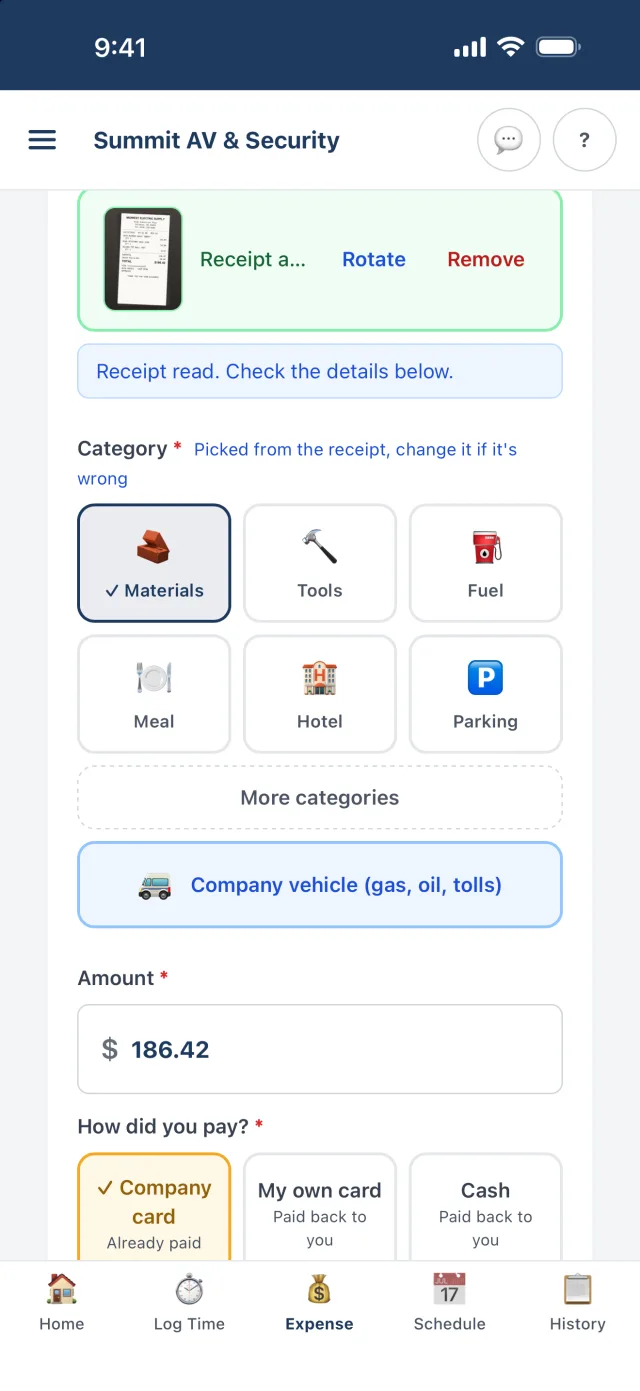
Tap Log expense, then Snap receipt. DayReport reads the receipt on its servers and fills in the vendor, total, date and store address, and the card's last four digits when the receipt prints them masked, and picks the category.
- Gas receipts also get the gallons and price per gallon.
- List your company cards by their last 4 digits and the card on the receipt picks Company card or the tech's own card for you. With no card number on the receipt, the tech picks how they paid.
- Several receipts at once, or split one receipt between jobs with the receipt attached once.
- The job starts on the one the tech is scheduled on today. Hotels also get check-in and check-out dates.
Forward the ones that never get printed
Each tech has a private address for receipts. Forward hotel, airline and online order receipts to it and they show up at the top of Log expense under Emailed receipts. Tap Use to start the expense.
- No more digging through inboxes on Friday.
- The receipt stays attached to the expense.
- Receipts are private to people signed in to your company.
The IRS accountable plan, built in
Enter the per diem you pay and DayReport applies the IRS rules: tax free only on overnight trips (a hotel night that day or the night before), up to the federal meals and incidentals rate, with 75% on the first and last day of a trip.
- New IRS and GSA rates apply on the day they take effect, with nothing to change. Pick Our own limit to use a different number.
- Receipts for $75 and up and for every hotel. Expenses turned in within 60 days.
- Mileage from Log time paid at the IRS rate, or your own.
- Payroll export and the expense report split tax-free and taxable amounts for you.
Where:TeamPer diem & expenses
| Day | Trip | Rate | Tax free | Taxable |
|---|---|---|---|---|
| Sun | Travel day, hotel | 75% | $51.75 | $0.00 |
| Mon | Hotel night | 100% | $69.00 | $0.00 |
| Tue | Hotel night | 100% | $69.00 | $0.00 |
| Wed | Travel home | 75% | $51.75 | $0.00 |
| Thu | No overnight | $0.00 | $69.00 |
Example uses a $69 per diem within the federal rate. Your company sets its own per diem; the tax-free limit follows the federal rate in effect that day.
Everyone knows what they are owed
Personal card and cash expenses go to the office to approve and pay back. Techs see Owed to you, Approved, not paid yet, or Paid back in History.
- Admins and office managers approve or send back expenses before payroll.
- After payroll, Mark reimbursements paid clears the week.
- Each receipt is paid in one pay period. Downloading that period again pays it again, and later files leave it out, so nobody is paid twice.
- Once a payroll file pays a receipt back, it is marked Exported: only the office can change it, and nobody can delete it.
- Each tech's week becomes an expense report PDF with the receipts attached.
- Company vehicle costs like fuel, oil changes and tolls are tracked by vehicle.
Questions people ask first
How accurate is the receipt reading?
It reads printed receipts well, including crumpled thermal paper. The tech always sees the filled-in fields and can correct them before submitting.
Does DayReport handle per diem?
Yes. Enter the per diem you pay per day on Per diem & expenses and techs check it on the days they are owed it. It starts on the IRS rules: tax free only on overnight trips, up to the federal meals and incidentals rate, with 75% on the first and last day of a trip. Payroll export splits tax-free and taxable amounts for you.
Is this tax advice?
No. DayReport follows the IRS accountable plan by default and your company sets its own rules. Check with your accountant about your situation.
Can expenses go into QuickBooks?
Yes. Reports export a QuickBooks import file of approved expenses today. A direct QuickBooks Online connection is rolling out: company card expenses go in as purchases with the receipt attached, and personal card and cash expenses as journal entries owed to the employee when an admin picks a reimbursements account. Admins, office managers and accountants can send once it is connected.
What if there is no signal?
Log the expense anyway. It and its receipt photo stay on the phone and upload on their own when there is signal.
How much does DayReport cost?
$19 per technician or foreman per month. Admins, office managers, project managers and accountants are free unless you give one a field seat to log their own time. 7 day free trial, no card to start.
Keep exploring
Try it on your next job
Set up your company, invite a technician and log a real day. Setup takes about ten minutes, and the first 7 days cost nothing.
No card to startAbout ten minutes to set upCancel any time